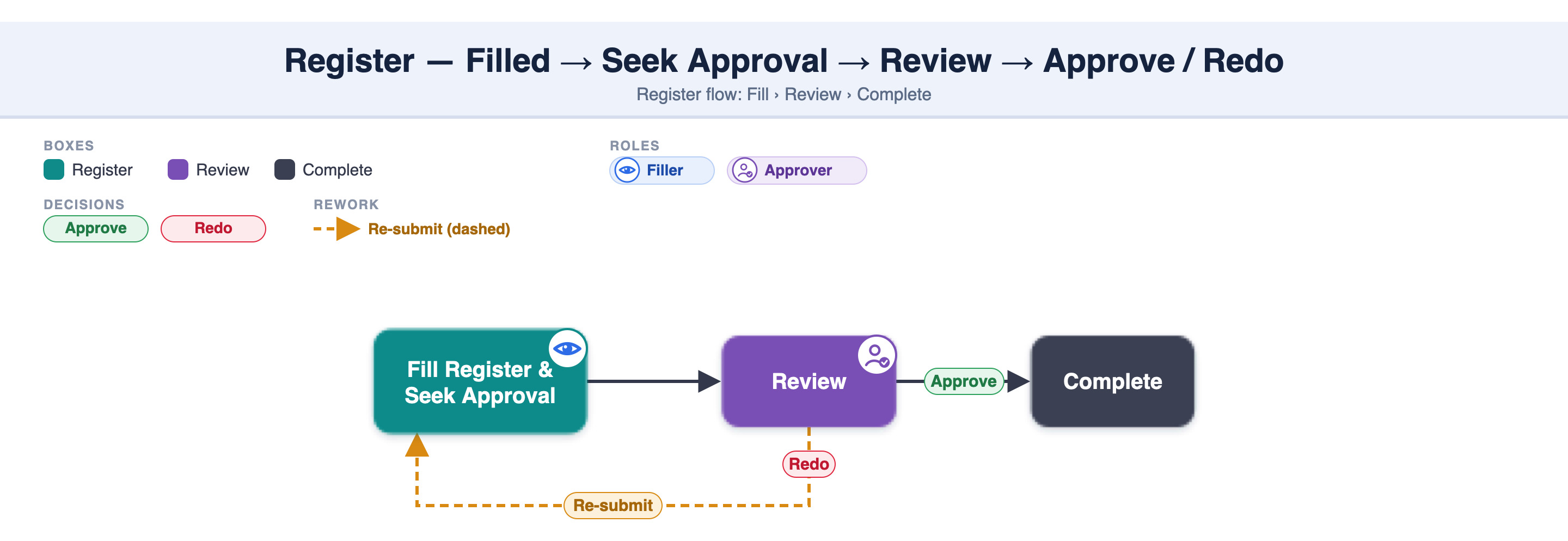
If a register has approval configured, a saved log isn't final until it's signed off. You Seek for approval; the log then goes through up to 3 sequential approval levels (L1 → L2 → L3). Each approver can Approve or give a Redo. Once the final level approves, the log is locked — and can only be overwritten by the System Admin.
Fill the log completely — all mandatory fields in both the Details and Table sections. The "Seek for approval" button activates only when all mandatory fields are filled.
Tap "Seek for approval." The log status becomes Approval Pending (L1).
Approver L1 reviews the log:
- Approve → moves to L2 (or, if L1 is the only level, the log becomes Approved and is locked). - Redo → returned to the filler with a reason.
On a Redo, correct the log. You must change at least one entry to re-activate the "Seek for approval" button, then seek approval again — the cycle restarts from L1.
Repeat through L2 and L3 if configured. When the final level approves, the log is Approved and cannot be changed by the filler, approvers, or Project Admin — only the System Admin can overwrite it.
Status | What it means |
|---|---|
Approval Pending | Submitted — waiting for the current level to review |
Redo | An approver returned it to the filler for correction |
Approved | All configured levels approved — locked; only the System Admin can overwrite it |
Redo given at | Goes back to | Approval cycle after resubmit |
|---|---|---|
L1 | Filler | Restarts from L1 |
L2 | Filler | Restarts from L1 → L2 |
L3 | Filler | Restarts from L1 → L2 → L3 |
Typical setup: Site Supervisor (L1) → QC Engineer (L2) → PMC / Client (L3).
Only when all mandatory fields in both the Details and Table sections of the log are filled.
Approval Pending → Approved, or Redo if an approver sends it back.
The log returns to the filler. You must change at least one entry to re-activate the "Seek for approval" button, then resubmit — and the approval cycle restarts from L1.
Up to three (L1 → L2 → L3), applied in sequence — L1 must approve before L2 is notified.
No — after you resubmit, the approval restarts from L1.
Not by the filler, approvers, or Project Admin — an approved log is locked. Only the System Admin can overwrite it.
"Seek for approval" needs all mandatory Details + Table fields filled.
A Redo requires at least one entry changed before you can seek approval again.
Approvals are sequential (L1 → L2 → L3); a Redo restarts the cycle from L1.
An Approved log is locked — only the System Admin can overwrite it.
A no-approval log has no status and can be edited anytime by an Inspector or Project Admin — see 2.4.3.
2.4.3 Fill a register — logs & entries
2.4.5 View & export register data
2.4.1 Register — overview & key concepts
When a register needs approval, you fill the log and seek approval. The approver reviews it and either Approves it (Complete), or sends a Redo — which returns it to you to update and re-submit.