In these workflows the Checker inspects the work directly.
If the inspection Passes, the stage is complete — or, when approval is set up, one to three approvers sign it off first.
If the inspection Fails (or an approver sends it back with Redo), the failed checkpoints are corrected and the Checker re-inspects them.
That's the whole idea. The only thing that changes from one workflow to the next is how many approval levels the stage has — none, one, two, or three.
Each checklist stage can have 0 to 3 approval levels (set on the stage — see 2.6.3 How to configure or edit a checklist). That single choice gives the four workflows below:
No approval — a Pass completes the stage.
L1 — one approver signs off after a Pass.
L1 → L2 — two approvers, in turn.
L1 → L2 → L3 — three approvers, in turn.
Checker / Inspector — the site supervisor or quality checker who performs the inspection on the mobile app: answers each checkpoint, adds the required photos and remarks, and submits the result as Pass or Fail.
Approver — a senior person (PM, quality head) who signs off a passed inspection. Only present when approval is configured. With more than one level, approvers act in order: L1 first, then L2, then L3.
1. Inspection. The Checker opens the EQC for the stage and answers every checkpoint. A checkpoint's answer can fail the stage if it hits its "Mark for QC fail" value, and any checkpoint set to require a photo or remark must have one before it can be completed. When all checkpoints are answered, the Checker submits — the stage result is either: - Pass — every checkpoint met its criteria. - Fail — one or more checkpoints hit a QC-fail value.
2. Approval (only if configured). After a Pass, the EQC goes to the approver instead of completing straight away. The approver reviews the inspection — the answers, photos and remarks — and either: - Approves — the inspection is signed off. If there are further levels, it moves to the next approver (L2, then L3); if this was the last level, the stage completes. - Redo — the approver isn't satisfied and sends it back to the Inspection stage.
3. Fail or Redo → Re-inspect. A Fail at inspection or a Redo from any approver both take the same path: the EQC returns to the Inspection stage. The team corrects only the checkpoints that failed (the ones that passed stay as they are), and the Checker re-inspects those points.
4. Next Stage. Once the inspection Passes and every configured approval level has Approved, the stage is complete and the EQC moves on — to the next stage of the checklist, or to its final Pass if this was the last stage.
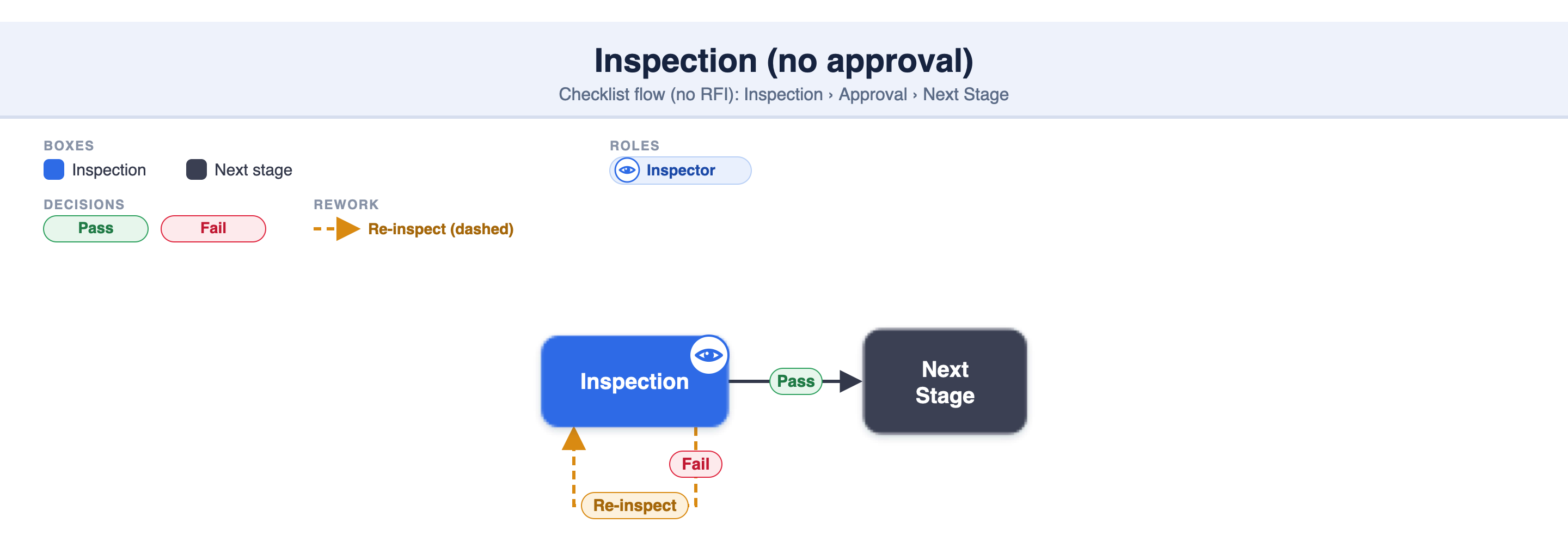
The simplest flow — no approver. The Checker inspects; a Pass completes the stage and the EQC moves to the next stage. On a Fail, the team fixes the failed checkpoints and the Checker re-inspects — repeating until it Passes.
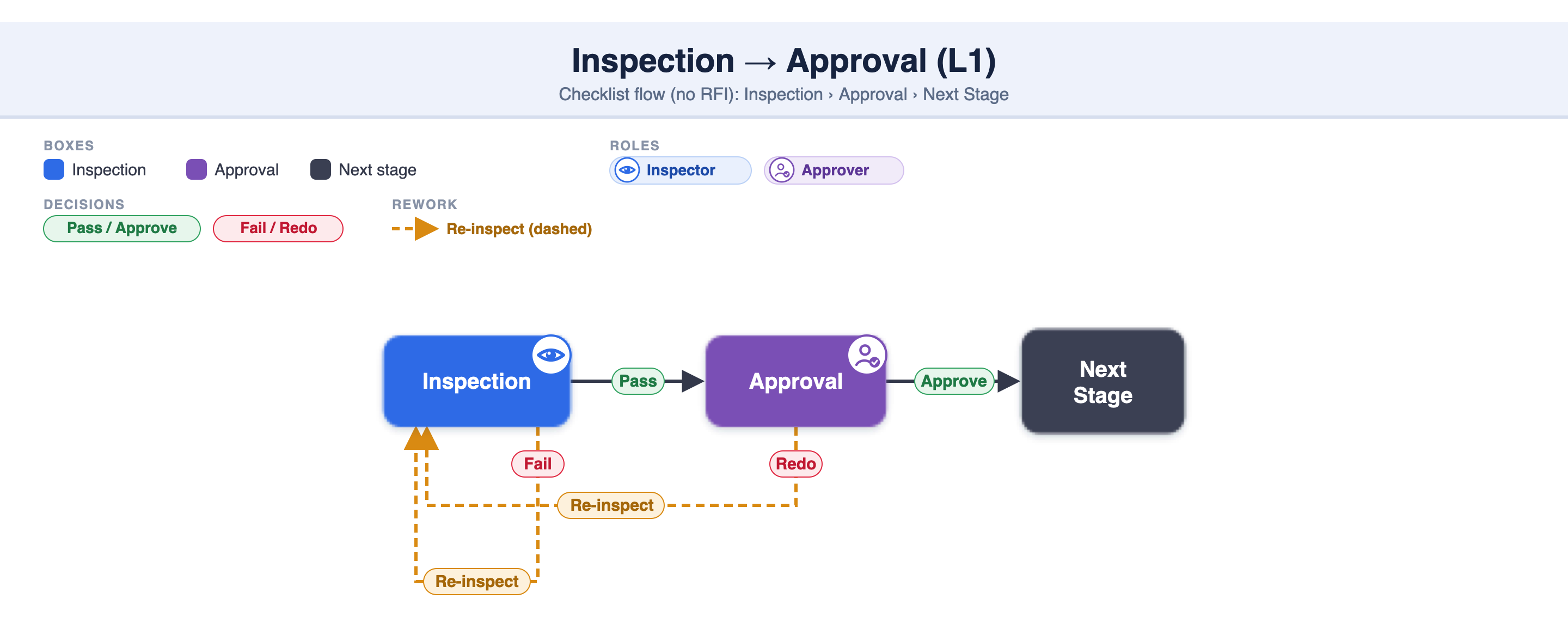
After the inspection Passes, one approver signs it off. Approve completes the stage; Redo sends it back to the Inspection stage. A Fail at inspection also returns it to re-inspect. This is the common setup where a checker inspects and a single senior person confirms.
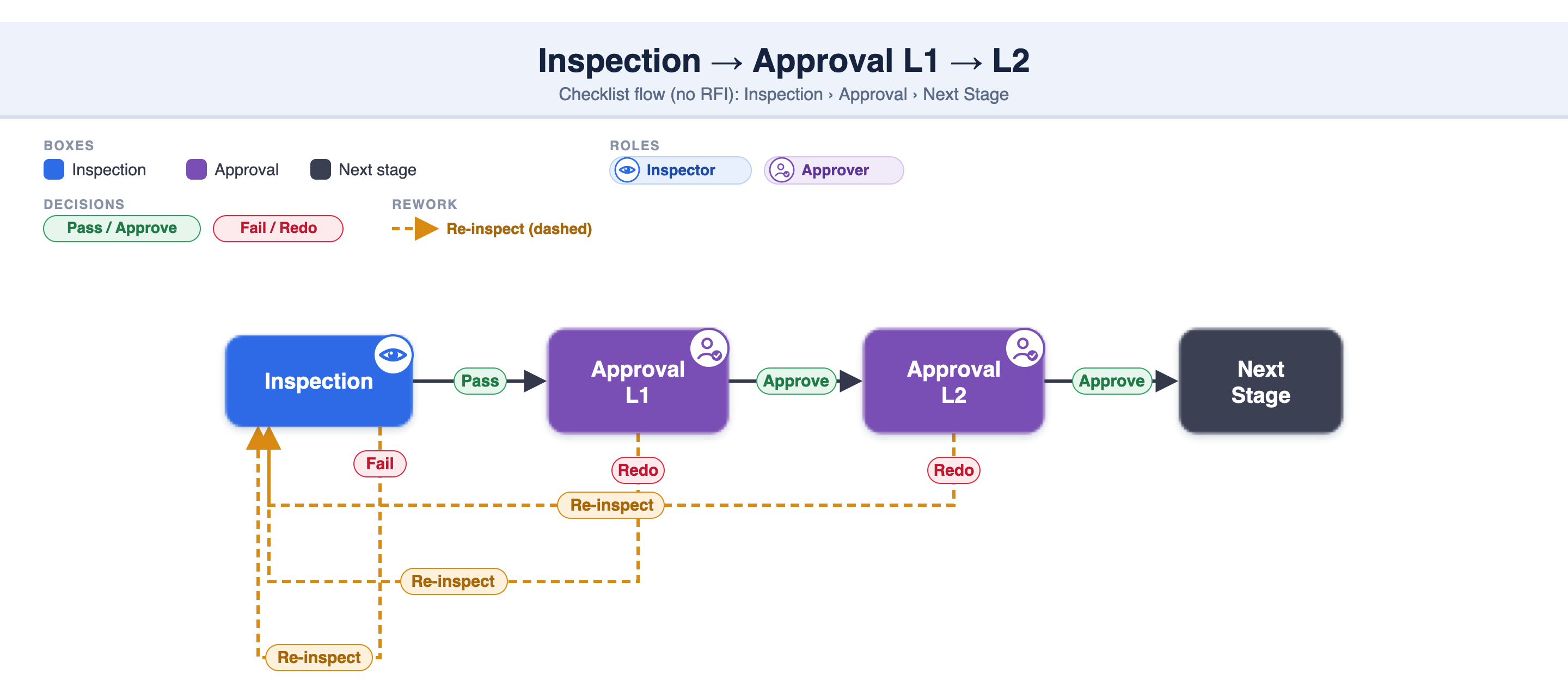
Same as above, but the sign-off runs through two approvers in turn. After a Pass, L1 reviews; if L1 Approves, L2 reviews; if L2 Approves, the stage completes. A Redo at either level — or a Fail at inspection — returns the EQC to the Inspection stage to be corrected and re-inspected. Used where two levels of authority must both confirm quality.
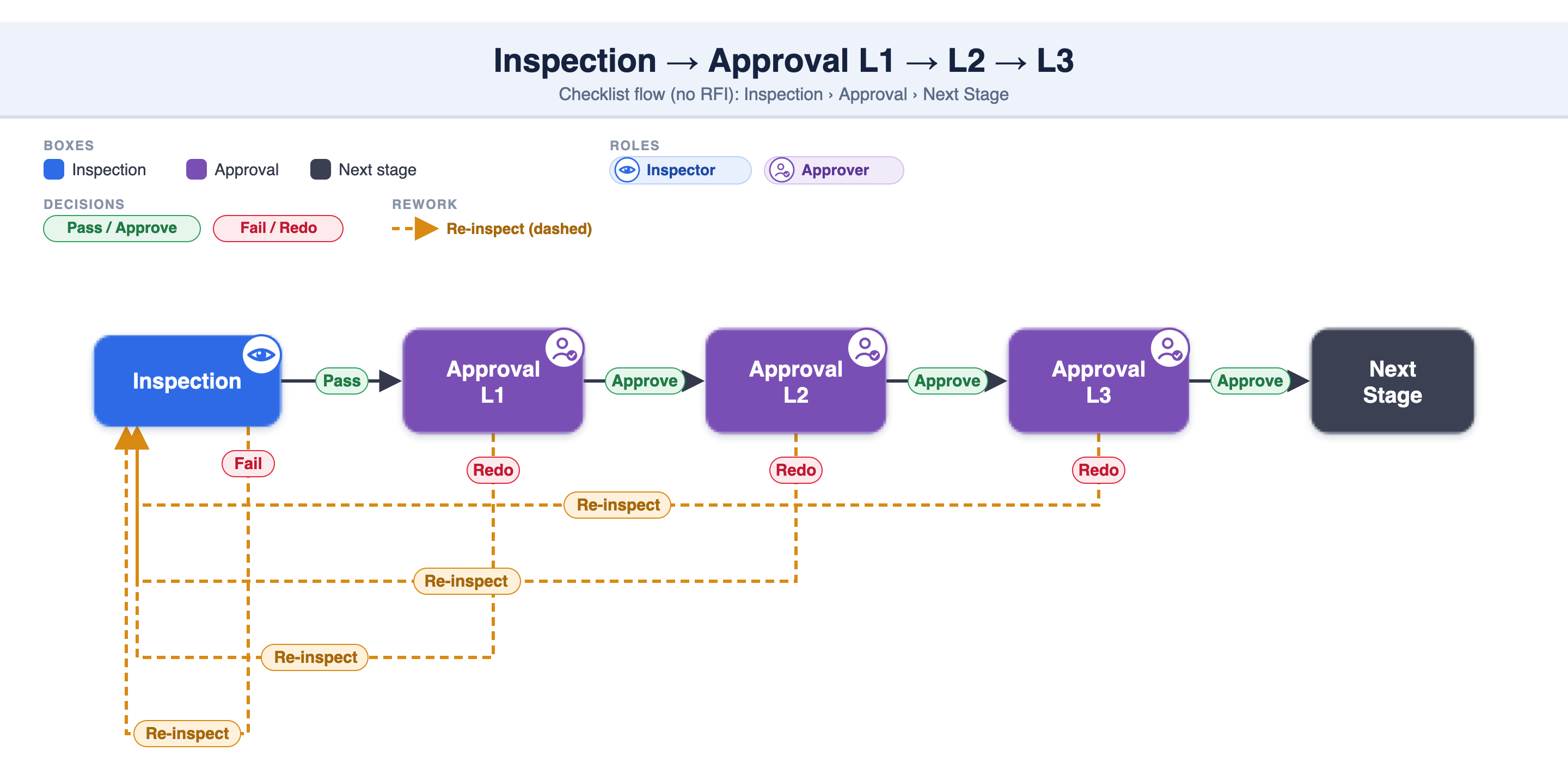
The full three-level sign-off. After a Pass, approval moves L1 → L2 → L3, and every level must Approve for the stage to complete. Any Redo at any level — or a Fail at inspection — sends the work back to re-inspect. This is the strictest setup, for high-value or high-risk activities that need three separate approvals.
The Checker / Inspector assigned to the checklist. They open the EQC and inspect the work whenever it's ready.
The team corrects only the failed checkpoints — the ones that passed are untouched — and the Checker re-inspects them. The flow restarts from the Inspection stage.
A sign-off after the inspection Passes. You can configure up to 3 levels (L1 → L2 → L3), and each level must Approve in turn before the stage completes.
It sends the EQC back to the Inspection stage — the same path as a Fail — so the team can correct and the Checker can re-inspect.
One after another. L1 must Approve before it reaches L2, and L2 before L3. A Redo at any level sends it back to re-inspect.
It's set on the checklist stage configuration — see 2.6.3 How to configure or edit a checklist. Choose 0 (no approval) up to 3 levels per stage.
The Checker inspects directly; a Pass either completes the stage or goes to the approver(s).
The workflow is decided entirely by the number of approval levels: none, L1, L1–L2, or L1–L2–L3.
Approval levels are sequential — L1 → L2 → L3 — and every level must Approve for the stage to complete.
A Fail (at inspection) or a Redo (from any approver) always returns to the Inspection stage; only the failed checkpoints are re-inspected.
These settings are per checklist stage, so different stages of the same checklist can have different approval depth.
The full workflow catalogue is in 2.2.13 digiQC Inspection Workflows.
2.6.3 How to configure or edit a checklist (multiple stages)
2.6.10 Setup RFI stage for Project Checklist
2.2.13 digiQC Inspection Workflows
